Friday, December 7, 2018

YouTube


YouTube is a video sharing service that allows users to watch videos posted by other users and upload videos of their own. Videos that have been uploaded to YouTube may appear on the YouTube website and can also be posted on other websites, though the files are hosted on the YouTube server. YouTube videos are posted by people from all over the world, from all types of backgrounds. Therefore, there is a wide range of videos available on YouTube. People also use YouTube to post instructional videos, such as step-by-step computer help, do-it-yourself guides, and other how-to videos.


     1. Search for "Youtube" on the web.
2. Think about what you want to achieve.
     3. Create your channel.
     4. Make some videos.
     5. Create playlists.
     6. Share your content.
     7. Analyse your data.
     8. Stay engaged with your audience.
     9. Link to your Google+ Account.
     10. Use Annotations and verify your website.

YouTube has some features of the youtube which are :

  • ·       Channel icon and art: Your introduction and calling card


        YouTube lets you set your own custom channel icon and channel art. Here’s an example of what both look like on the page:


Icon is the square image that appears at the top left of your channel. The icon let you to put your logo. The channel art is where you can provide a little bit more information about who you are and what your channel is about.

  • ·       Page Layout: Organizing your content
People come and visit your channel and it’s time for you to dazzle them with you amazing and incredible content. You already have attracted them to subscribe your channel. So, to dazzle them with your incredible content, here is the best place where you can design your own page layout.


  • ·       Better Live Streams
Live streaming is not only for video content but also for entertainment, gaming, learning and more are part of the delivery system. Content creators, whether it be video, apps or games, will now have an easier time of setting up and managing their live streams. The company also announced its upcoming YouTube Gaming app, which will give gamers a chance to take the improved live stream technology for a ride. So, users can enjoy video, apps or games through better live streams.

So why should you consider using YouTube for your teaching and learning? There are many benefits of YouTube in teaching and learning which are :

Ø  Easily shared. As students themselves find useful content, they can easily share it with teachers, friends, and classmates.
Ø  A place for teachers to learn. Teachers can learn more about their content or their teaching practice from these resources too!
Ø  Videos are interesting and engaging. There’s something about videos that make them easy hooks that get students interested in watching and learning more.
Ø  Student can contribute themselves. And don’t forget this is YOUTube … which means that students themselves can create original content and share their own expertise with viewers. This is a great way for students to develop an online presence and have a creative way to show what they know.

Sunday, November 25, 2018

PowerPoint


Have you heard about Microsoft PowerPoint? Or have you used Microsoft PowerPoint before this? I think many people have used Microsoft PowerPoint especially for presentation. Microsoft PowerPoint is a powerful presentation software developed by Microsoft. Microsoft also developed many more besides Microsoft PowerPoint such as Microsoft Word, Microsoft Excel, Publisher, etc. But for this entry today, I will share with you guys about Microsoft PowerPoint only. Microsoft PowerPoint is also one of the teaching and learning tools. Most people prefer to use Microsoft PowerPoint as it is easy, and the program uses slides to convey information is rich in multimedia. The term “slide” here is refers to the slide projector, which this software effectively replaces.

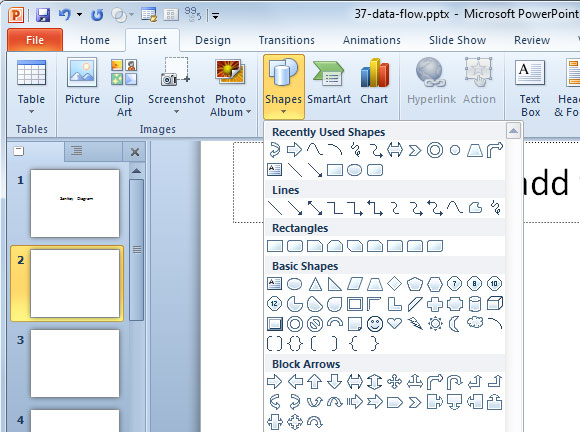
Microsoft PowerPoint was originally designed to provide visuals for group presentations within business organization but has come to be very widely used in many other communication situations, both in business and beyond. The picture below is an example of what Microsoft PowerPoint looks like.

PowerPoint slides can be plain with only text, or they can include pictures and even animation, including moving text and images. However, in PowerPoint, text also can be formatted in the same way as text that can formatted in Microsoft Word, including color, size and font type. In addition, there are some features that you need to know when using PowerPoint and the features are:

1) Adding Smart Art.
Please take noted that you are not confusing between SmartArt and WordArt. WordArt just allows you to display text using a wide variety of different formats and effects, while SmartArt is a comprehensive and flexible business diagram tool that greatly improves and can be used to create professional diagrams and create an organisation.

2) Inserting Shapes and Images.
It is important to be able to include shapes independently of SmartArt and worth being familiar with the various Drawing Tool format options. You can add the shapes in the diagram that you make before. For example, you used to add title or content in the slide. How to create the shape? You select your chosen shape, click in your slide to insert the shape, then click and drag with the mouse to create the shape and size you want.

Next, to insert the images, you have two choices which are Insert Picture from File or Insert Clip Art. In addition, PowerPoint 2010 has a new ‘Screenshot’ which you can capture an entire window or part of a window for inclusion on a slide. You can also copy image and just paste it on the slide.

3) Slide Transitions and Adding Animations.
Slide transitions can make your presentation clearer and more interesting. Simple animation effects are often used to add interest to bullet point text. Two main kinds of animation are available in a PowerPoint presentation: transition from one slide to the next and the animation of images/text on a specific slide.

Different with transition, animation can be applied to every object on a slide – including titles and other text boxes. To apply an animation effect, choose the object or objects to be animated, then choose Animation Styles or Add Animation from the Animation toolbar.

So why should you consider using PowerPoint for your teaching and learning? There are many benefits of PowerPoint in teaching and learning which are :

· Appropriate use of PowerPoint can enhance the teaching and learning experience for both staff and students.
· The portability of the files, especially on compact disks (CDs) with their large capacity, allows presentations to be given wherever the technology is available or distributed where appropriate. Presentations can also be set up to run automatically if required e.g. as demonstrations/instructions within a laboratory.
· Interesting presentation can be produced by using multimedia which can help to improve the audience’s focus. You also can use images, audio and video to have a greater visual impact.

To get start on PowerPoint is easy and simple; you just need to open the program on your computer or laptop and then you will be presented with a basic design with a space or text. From here, you can choose your own design and get creating!

Enjoy and have a nice day! 


Saturday, November 10, 2018

EDU 455


Assalamualaikum and hello guys! 

So, for this next entry, I want to share with you guys about this one subject which we as the 2nd Semester students need to take. What is that subject? The subject is Instructional Technology, or the code is EDU 455.

Credit hour for this course is 2.00 and by learning this course, students will get to know the various computer applications software such as word processing, desktop publishing, web pages development, spreadsheet use, telecommunications and their uses in all areas of education. In my opinion, everyone needs to know how to use technology even the basic knowledge. Why? Because as we can see, we are now living in modern era and technology is such an important thing in our daily life. Therefore, at the end of this course syllabus, students can understand about computers (basic elements and components of computer system), how to use computer applications, and students also can know how to access information on the World Wide Web as an integrated teaching and learning tool.

This course is also can use to support teaching and learning. For example, teachers in school can use web-based teaching and learning tools and educational portals. This course also helps students to understand other alternatives of teaching and learning techniques that can be used. Therefore, it is important not only for students but also for other people to learn this subject even the basic one in order to increase their knowledge about technology.

Honestly, I do not have lots of confident for this subject as I know that I’m someone who did not have much knowledge in computer and technology.  So, I just be positive and said to myself “It’s okay. Let’s learn a new knowledge. We can do it.” Perhaps I can get a good grade for this subject which is Instructional Technology (EDU 455). Do pray the best for me!


Thank you 😊


Friday, November 9, 2018

LET KNOW ME !


Assalamualaikum.

For this first entry, let me introduce myself :)


Enjoy yourself !